
# PC前端
# 1、创建模块
项目以模块划分。
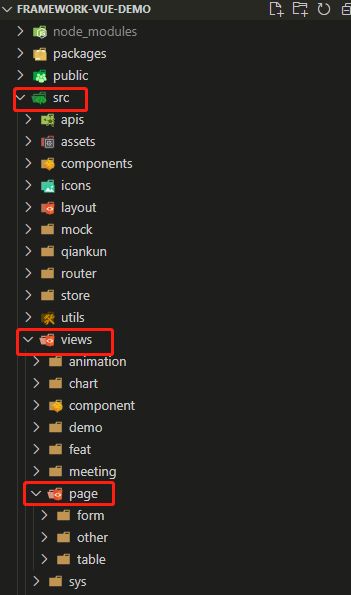
如:framework-vue-demo项目中,在“src->views”下,创建了“page”模块。若属于此模块的功能,则应写在此模块下。
 ````
````
# 2、路由配置
开发了功能后,前端页面还不能被vue检测到,需要开发者自己将页面的路由配置好。
如:1. 在src->router->module下,创建“page”模块的路由文件。
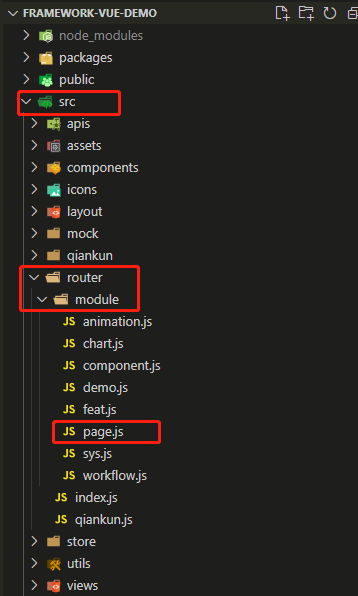
路由默认为:模块名 + 页面 名,() => import()进行懒加载
{
      path: 'table/base',
      meta: { title: '表格' },
      component: () => import('@/views/page/table/base/Index')
}
路由默认有路由守卫进行权限控制。如果不是登陆状态,去访问菜单,就会跳回登录页;访问后端没传回的菜单时,会跳405没有权限页。
如果不是登录状态访问菜单,需要在路由里面加isLogin: false, 如下
{
      path: 'table/base',
      meta: { title: '表格', isLogin: false },
      component: () => import('@/views/page/table/base/Index')
}
如果要访问没有在管理后台创建的菜单,需要在路由里面加isMenu: false, 如下
{
      path: 'table/base',
      meta: { title: '表格', isMenu: false },
      component: () => import('@/views/page/table/base/Index')
}
- 将“
page”模块的路由放在入口index.js中。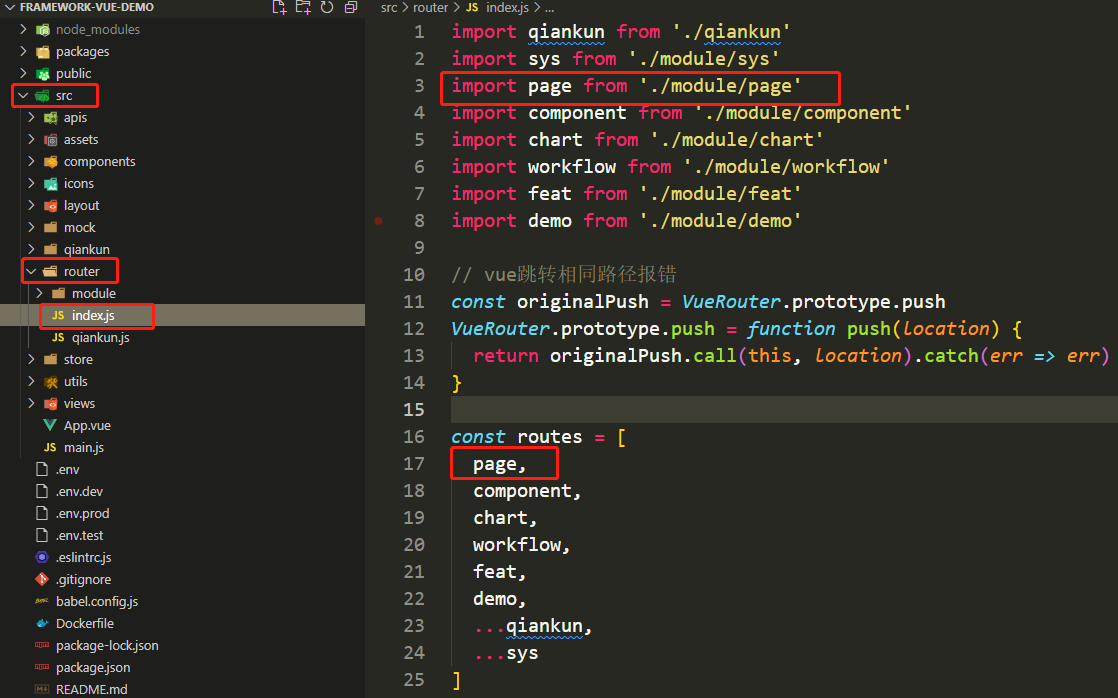
# 3、后端接口配置
如果我们在页面上写死请求后端的API,很容易会出现耦合,而且不方便维护。我们应当将后端API统一配置,每个模块的API都放到一个文件中,这样就能有效统一管理了。

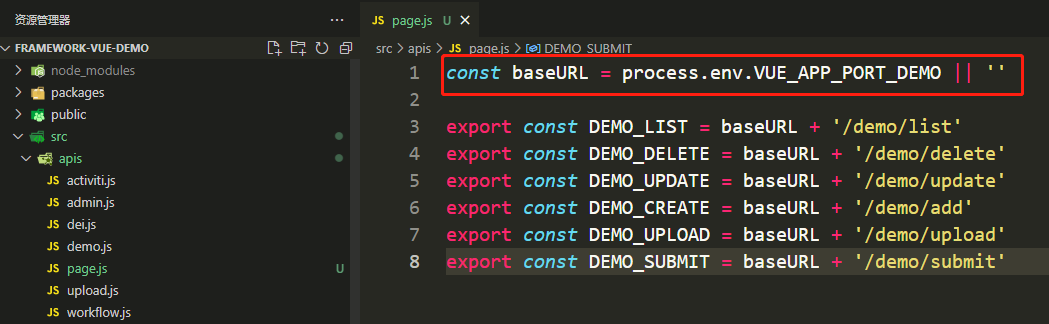
在page.js文件中,首行引入环境配置文件中的“后端访问地址”。如下图,引入VUE_APP_PORT_DEMO,每一个API都引用。如果后端API来源不同访问地址,应配置多个。
# 4、模块开发
# 4.1 列表开发
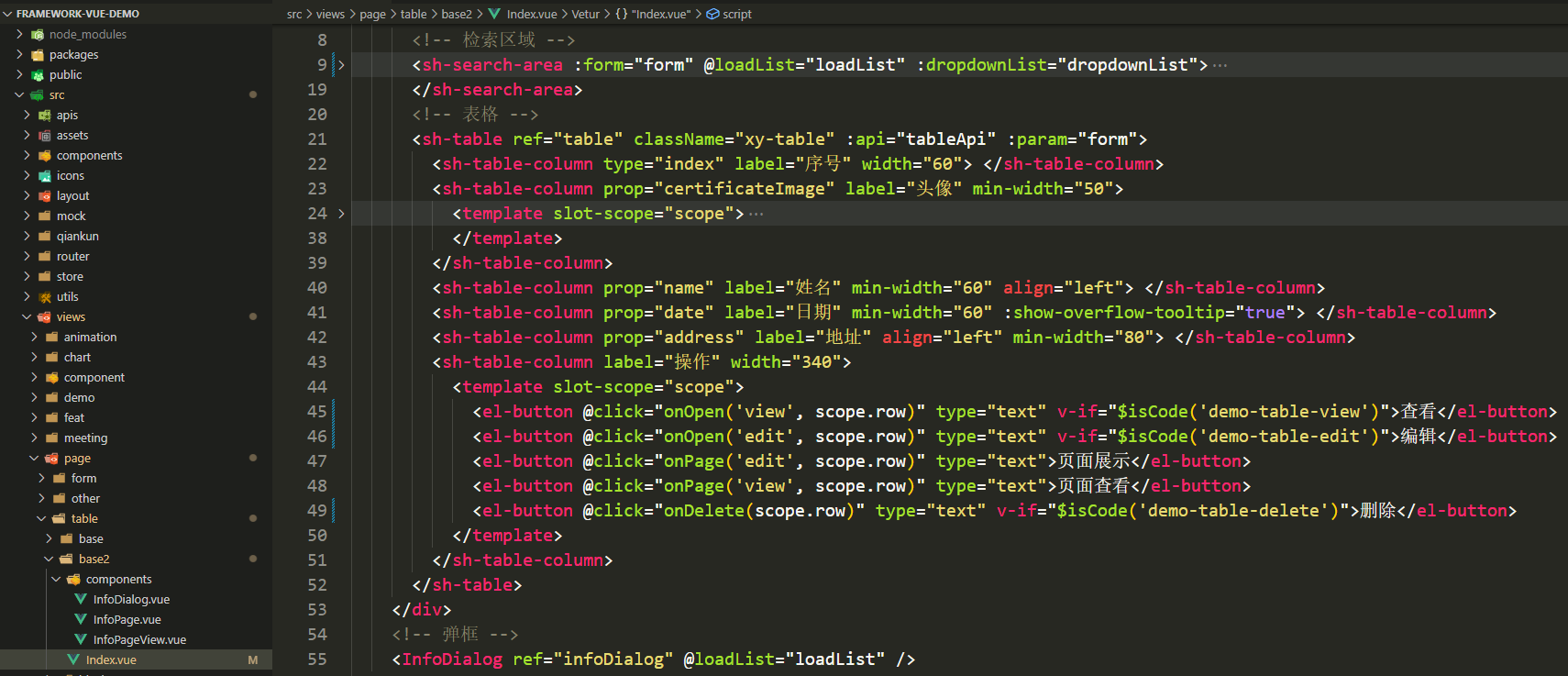
列表开发的具体用法可参考 - 网页端生态- 公用组件。
# 4.2 增改查弹窗开发
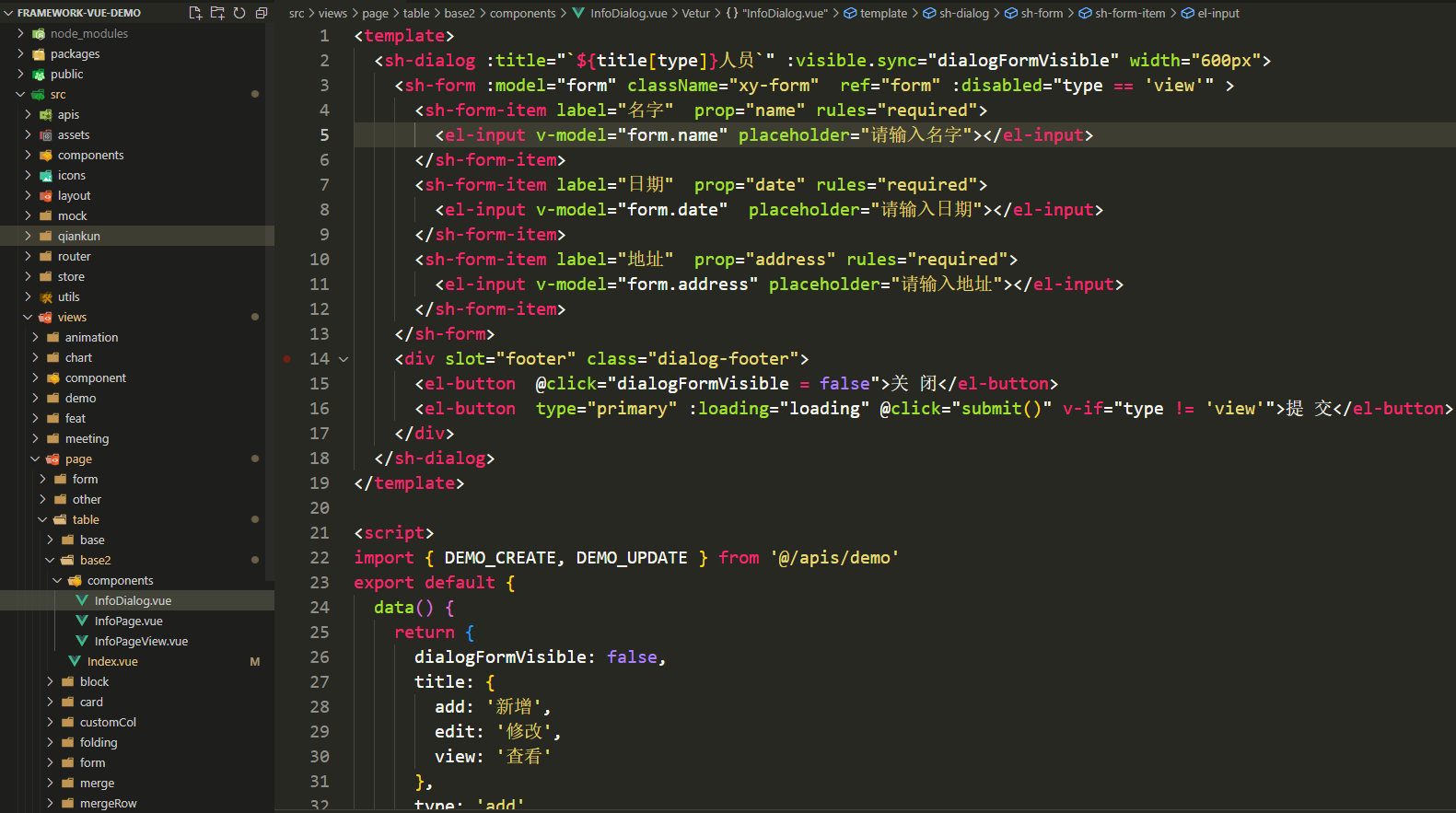
弹窗开发的具体用法可参考 - 网页端生态- 公用组件。
# 4.3 删除开发
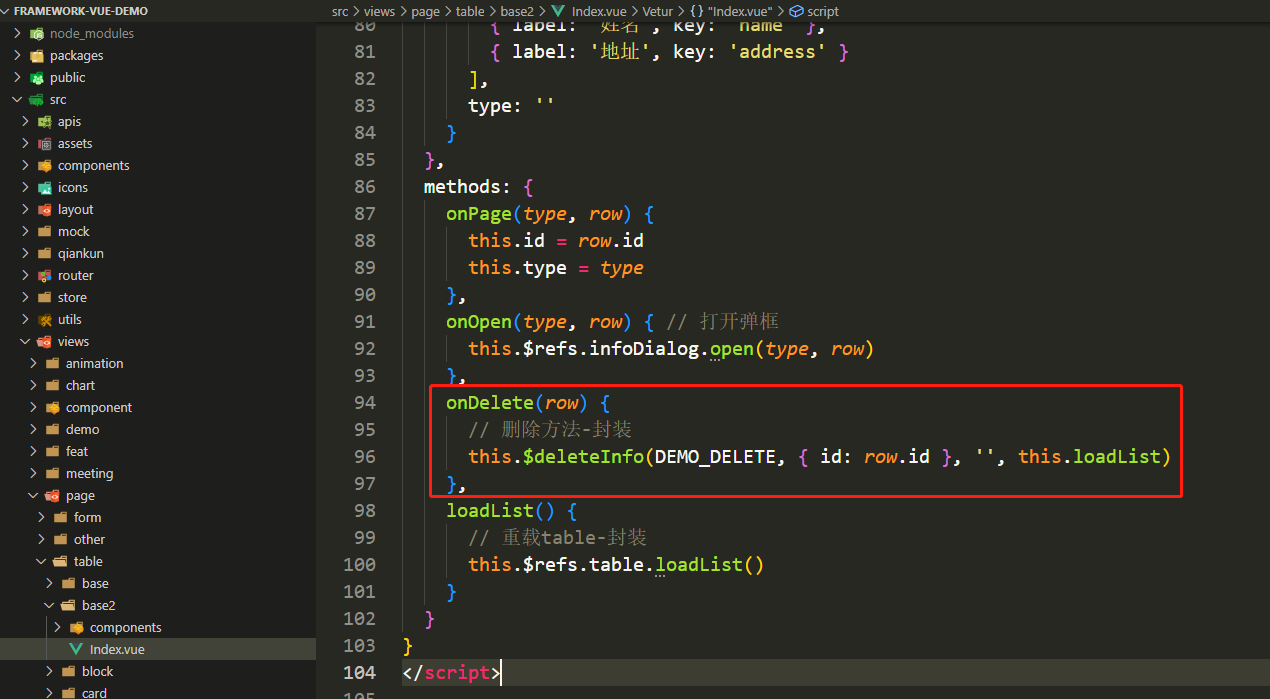
删除开发的具体用法可参考 - 网页端生态- 公用方法。
# 5、iframe嵌入页面
# 5.1 嵌入组织中心、待办
新建iframe/Index.vue文件,其中process.env.VUE_APP_CONSTRUCTION 为系统的后端地址,/getAccessToken接口为跨应用重新获取token
<template>
  <div>
    <iframe ref="iframe" :src="url" height="740px" width="100%" frameborder="0"></iframe>
  </div>
</template>

<script>
export default {
  data() {
    return {
      url: ''
    }
  },
  watch: {
    $route: {
      handler: function (val) {
        this.getToken(val.path)
      },
      immediate: true,
    }
  },
  methods: {
    getToken (route) {
      this.$get(
        process.env.VUE_APP_CONSTRUCTION + '/getAccessToken',
        {},
        data => {
          if (route.indexOf('/iframe')  == 0) {  // 管理后台
            let path = route.replace('/iframe', 'other')
            this.url = `${process.env.VUE_APP_JXY}/${path}?code=${data.data}`
          } else { // 个人端
            let path = route.replace('/jxy', '')
            this.url = `${process.env.VUE_APP_PORTAL}${path}?code=${data.data}`
          }
        }
      )
    }
  }
}
</script>
注册路由iframe.js(Iframe对应上面的文件路径):
const Iframe = () => import('@/views/iframe/Index')
export const iframe = [
	{
      path: '/iframe/orgType',
      meta: { title: '组织维度'},
      component: Iframe
    },
    {
      path: '/iframe/orgManagenent',
      meta: { title: '组织管理'},
      component: Iframe
    },
    {
      path: '/iframe/personType',
      meta: { title: '权限管理'},
      component: Iframe
    },
    {
      path: '/iframe/userManagement',
      meta: { title: '用户管理'},
      component: Iframe
    },
    {
      path: '/iframe/chargeOrganization',
      meta: { title: '分/子组织'},
      component: Iframe
    },
    {
      path: '/iframe/applicationManagement',
      meta: { title: '应用管理'},
      component: Iframe
    },
    {
      path: '/iframe/selfMenu',
      meta: { title: '菜单管理'},
      component: Iframe
    },
    {
      path: '/iframe/selfResource',
      meta: { title: '资源管理'},
      component: Iframe
    },
     {
      path: '/iframe/meeting',
      meta: { title: '会议室管理'},
      component: Iframe
    },
    {
      path: '/iframe/roleManagement',
      meta: { title: '角色管理'},
      component: Iframe
    },
    {
      path: '/iframe/unitType',
      meta: { title: '企业类型'},
      component: Iframe
    },
    {
      path: '/iframe/unitAuth',
      meta: { title: '企业授权'},
      component: Iframe
    },
    // 个人端
    {
      path: '/jxy/xy/backlog',
      meta: { title: '待办事项'},
      component: Iframe
    },
    {
      path: '/jxy/xy/backlogProcessedList',
      meta: { title: '已办事项'},
      component: Iframe
    },
    {
      path: '/jxy/xy/waitDoneOverTimeRecord',
      meta: { title: '超时记录'},
      component: Iframe
    },
    {
      path: '/jxy/xy/waitDoneOverTimeStatistics',
      meta: { title: '超时统计'},
      component: Iframe
    },
    {
      path: '/jxy/other/common',
      meta: { title: '通用审批'},
      component: Iframe
    },
    {
      path: '/jxy/other/fileSend',
      meta: { title: '发文管理'},
      component: Iframe
    },
    {
      path: '/jxy/other/fileReceived',
      meta: { title: '收文管理'},
      component: Iframe
    },
     {
      path: '/jxy/other/noticePublish',
      meta: { title: '通知公告'},
      component: Iframe
    },
    {
      path: '/jxy/other/noticeAll',
      meta: { title: '全部公告'},
      component: Iframe
    },
    {
      path: '/jxy/other/enterpriseNotice',
      meta: { title: '公告发布'},
      component: Iframe
    },
    {
      path: '/jxy/other/platformNotice',
      meta: { title: '平台通告'},
      component: Iframe
    },
    {
      path: '/jxy/other/myConference',
      meta: { title: '我的会议'},
      component: Iframe
    },
    {
      path: '/jxy/other/meetingReserve',
      meta: { title: '会议室预定'},
      component: Iframe
    },
    {
      path: '/jxy/xy/attachment/publish',
      meta: { title: '发布附件'},
      component: Iframe
    },
    {
      path: '/jxy/xy/attachment/publishPlatform',
      meta: { title: '发布平台附件'},
      component: Iframe
    },
    {
      path: '/jxy/xy/attachment/all',
      meta: { title: '全部附件'},
      component: Iframe
    },
    {
      path: '/jxy/fourLibrary/index',
      meta: { title: '综合查询'},
      component: Iframe
    },
    {
      path: '/jxy/fourLibrary/projectInfo',
      meta: { title: '项目信息'},
      component: Iframe
    },
    {
      path: '/jxy/fourLibrary/singleProject',
      meta: { title: '单项工程'},
      component: Iframe
    },
    {
      path: '/jxy/fourLibrary/unitProject',
      meta: { title: '工程信息'},
      component: Iframe
    },
    {
      path: '/jxy/fourLibrary/monomerProject',
      meta: { title: '单体工程'},
      component: Iframe
    },
    {
      path: '/jxy/fourLibrary/landPlanPermission',
      meta: { title: '用地规划'},
      component: Iframe
    },
    {
      path: '/jxy/fourLibrary/workDrawingExamine',
      meta: { title: '施工图审查'},
      component: Iframe
    },
    {
      path: '/jxy/fourLibrary/projectDesign',
      meta: { title: '工程设计'},
      component: Iframe
    },
    {
      path: '/jxy/fourLibrary/projectBidding',
      meta: { title: '工程招投标'},
      component: Iframe
    },
    {
      path: '/jxy/fourLibrary/workLicence',
      meta: { title: '施工许可'},
      component: Iframe
    },
    {
      path: '/jxy/fourLibrary/enterpriseInfo',
      meta: { title: '企业信息'},
      component: Iframe
    },
    {
      path: '/jxy/fourLibrary/personalnfo',
      meta: { title: '人员信息'},
      component: Iframe
    },
    {
      path: '/jxy/fourLibraryManage/index',
      meta: { title: '综合查询'},
      component: Iframe
    },
    {
      path: '/jxy/fourLibraryManage/projectInfo',
      meta: { title: '项目信息'},
      component: Iframe
    },
    {
      path: '/jxy/fourLibraryManage/singleProject',
      meta: { title: '单项工程'},
      component: Iframe
    },
    {
      path: '/jxy/fourLibraryManage/unitProject',
      meta: { title: '工程信息完善'},
      component: Iframe
    },
    {
      path: '/jxy/fourLibraryManage/monomerProject',
      meta: { title: '单体工程'},
      component: Iframe
    },
    {
      path: '/jxy/fourLibraryManage/enterpriseInfo',
      meta: { title: '企业信息'},
      component: Iframe
    },
    {
      path: '/jxy/fourLibraryManage/personalnfo',
      meta: { title: '人员信息'},
      component: Iframe
    },
    {
      path: '/jxy/fourLibraryManage/projectPreparation',
      meta: { title: '开工前资料准备'},
      component: Iframe
    },
  ]
登录企业账号在菜单管理里面配置对应的菜单和路径,如:
菜单名称:菜单管理
菜单url: /iframe/selfMenu
注意:组织中心为管理后台,待办为建协云个人端,对应的各个环境地址如下
管理后台:
    // 开发地址
    VUE_APP_PORTAL = 'http://192.169.0.220:8097'
    // 测试环境
    VUE_APP_PORTAL =  'http://zt.3hmis.com:30004'
    // 正式地址
    VUE_APP_PORTAL = 'https://e.jianxiecloud.com'

个人端:
    //开发环境
    VUE_APP_JXY = 'http://192.169.0.220:8090'
    //测试环境
    VUE_APP_JXY = 'http://zt.3hmis.com:30001'
    //生产环境
    VUE_APP_JXY = 'https://p.jianxiecloud.com'
# 5.2 抛出嵌入页
新建文件src/layout/components/OtherBlankLayout.vue代码如下, 其中process.env.VUE_APP_CONSTRUCTION业务后端地址,/grantAuthentication接口为跨应用获取用户信息以及权限
<template>
  <div class="blank-layout" v-if="show">
    <router-view></router-view>
  </div>
</template>

<script>
export default {
  data () {
    return {
      show: false
    }
  },
  methods: {
    getUserInfo(code) {
      this.$post(
        process.env.VUE_APP_CONSTRUCTION + '/grantAuthentication',
        {code: code || this.$store.state.token},
        data => {
        	if (code) {
              let user = data.data
              // 存token
              sessionStorage.setItem('token', user.token)
              this.$store.commit('token', user.token)
              // 存用户信息
              sessionStorage.setItem('user', JSON.stringify(user))
              this.$store.commit('user', user)
              // 重新加载按钮权限
              Vue.prototype.$isCode = this.$getResourceCode()

            }
          this.show = true
        },
        error => {
          this.$message.error(error.msg)
          this.show = true
        }
      )
    }
  },
  created () {
    let code = this.$route.query.code
    if (code) { // iframe嵌入
      this.getUserInfo(code)
    } else { // 微前端
      this.getUserInfo()
    }
  }
}
</script>
然后把对应页面的路由注册到该布局下,例如建协云的应用管理:
export const other =  [
  {
    path: '/other',
    meta: { title: '布局', isLogin: false},
    component: () => import('@/layout/components/OtherBlankLayout'),
    children: [
      {
        path: '/other/applicationManagement',
        meta: { title: '应用管理', isLogin: false},
        component: () => import('@/views/admin/applicationManagement/Index')
      }
   }
 ]
要嵌入其它系统嵌入页请参考嵌入建协云组织中心和待办